Update: Starting November 2025, Gmail is ramping up its enforcement on non-compliant traffic. Messages that fail to meet the email sender requirements will experience disruptions, including temporary and permanent rejections.Update: Starting November 2025, Gmail is ramping up its enforcement on non-compliant traffic. Messages that fail to meet the email sender requirements will experience disruptions, including temporary and permanent rejections.
Introduction
In response to the ever-evolving challenges posed by spam, phishing, and email-based fraud, email service giants Microsoft, Google, and Yahoo have implemented significant changes for bulk senders—businesses that send 5,000+ emails a day. Google and Yahoo were the first to announce these requirements in October 2023, with Microsoft following suit in April 2025. As of 2026, these requirements are now industry standard and strictly enforced across all three providers.
These requirements share a handful of key mandates that can broadly be grouped into the following categories:
- Authenticate your domain. Protect recipients from malicious messages and protect your organization from being impersonated.
- Make it easy to stop receiving email. Give recipients an easy way to unsubscribe from your messages.
- Don’t spam. Send messages people want to receive and only send them to people who signed up to get messages from you.
The driving force behind these new policies is a collective commitment to make inboxes safer and less spammy. Through their united stance, Microsoft, Google, and Yahoo are signaling that email security is no longer a nice to have. By 2026, the email security standards once deemed best practice are now mandated reality. Those who fail to meet these requirements will see these three service providers limiting sending rates or marking legitimate messages as spam. For Microsoft users, messages that fail to meet the requirements will be rejected entirely.
Whether you’re a marketer, an IT professional, or a small business owner who sends more than or around 5,000 emails a day to Microsoft, Google, or Yahoo inboxes, this guide will help you understand the requirements, their benefits, and how to prepare for them.
What changed and what to do now
The bulk sender landscape shifted dramatically between 2024 and 2026. Here's a quick breakdown of what changed and exactly what you need to do about it.
Timeline of enforcement changes
Date | Provider | What changed |
February 2024 | Google, Yahoo | Initial enforcement begins. Non-compliant messages start seeing temporary deferrals (421 errors) |
April 2024 | Google, Yahoo | Stricter enforcement. Rejection rates increase for unauthenticated mail |
May 2025 | Microsoft | Outlook.com enforcement begins. Non-compliant messages rejected for hotmail.com, live.com, outlook.com addresses |
November 2025 | Ramped-up enforcement. Non-compliant traffic now experiences permanent rejections (550 errors) | |
2026 | Google, Yahoo & Microsoft | Full enforcement across Microsoft, Google, and Yahoo. These requirements are now industry standard |
What you need to do right now
If you're not yet compliant:
- Check your current status. Use Red Sift Investigate to send a test email from each of your email-sending services. You'll get a visual breakdown of exactly what needs fixing.
- Fix authentication gaps. The most common issues we see: Missing or misconfigured SPF record DKIM not set up for all sending services No DMARC record published SPF or DKIM not aligned with the From domain
- Enable one-click unsubscribe. Check your ESP (HubSpot, Mailchimp, Salesforce Marketing Cloud, etc.) settings. Most platforms have this enabled by default, but verify it's working.
- Monitor your spam rate. Set up Google Postmaster Tools and Yahoo's Complaint Feedback Loop. Keep your rate below 0.1% and never let it hit 0.3%.
If you're already compliant:
- Move toward DMARC enforcement. The current requirement is p=none, but industry best practice is p=reject. This gives you full protection against domain impersonation.
- Monitor continuously. Authentication can break when you add new sending services, change ESPs, or make DNS changes. Set up ongoing monitoring with a tool like Red Sift OnDMARC.
- Watch for policy updates. Microsoft, Google, and Yahoo may tighten requirements further. DMARC at p=reject could become mandatory in the future.
Quick decision guide
You need to take action if any of these apply:
- You send 5,000+ emails per day to Gmail, Yahoo, or Outlook.com addresses
- You've seen 421 or 550 SMTP errors mentioning authentication
- Your DMARC record is missing or set to p=none without SPF/DKIM alignment
- You don't have a DKIM signature for all your sending services
- Your unsubscribe process takes more than 2 days
- Your spam complaint rate is above 0.1%
You're in good shape if:
- SPF and DKIM pass for all sending services
- At least one of SPF or DKIM aligns with your From domain
- DMARC is published (ideally at p=reject, minimum p=none)
- One-click unsubscribe is enabled and processing within 2 days
- Spam rate stays below 0.1%
- FCrDNS is configured for your sending IPs
- TLS is enabled for email transmission
Enforcement checklist
Use this checklist to verify compliance across all your email-sending services. Remember: you need to check each ESP and sending domain separately.
Email authentication checklist
Requirement | Status | How to check | How to fix |
SPF record published | [ ] | Use Red Sift Investigate or check DNS for TXT record starting with "v=spf1" | Add SPF record to DNS. Include all authorized sending IPs |
DKIM signature present | [ ] | Send test email and check headers for "DKIM-Signature" | Configure DKIM in your ESP and add public key to DNS |
SPF passes | [ ] | Check email headers for "spf=pass" | Ensure sending IP is included in SPF record |
DKIM passes | [ ] | Check email headers for "dkim=pass" | Verify DKIM keys are correctly published in DNS |
SPF or DKIM aligned | [ ] | The domain in SPF or DKIM must match the From header domain | Configure your ESP to send with aligned domains |
DMARC record published | [ ] | Check DNS for TXT record at _dmarc.yourdomain.com | Add DMARC record: v=DMARC1; p=none; rua=mailto:dmarc@yourdomain.com |
DMARC policy at least p=none | [ ] | Check your DMARC record | Update policy to p=none (minimum) or p=reject (recommended) with Red Sift's support |
FCrDNS configured | [ ] | Reverse DNS lookup on sending IP should return hostname that resolves back to same IP | Contact your hosting provider or ISP to configure reverse DNS |
TLS enabled | [ ] | Check email headers for TLS encryption indicators | Enable in ESP settings (most providers enable by default) |
Get started now with automatic results
One-click unsubscribe checklist
Requirement | Status | How to check | How to fix |
List-Unsubcribe header present | [ ] | Check email headers for "List-Unsubscribe" and "List-Unsubscribe-Post" | Enable in ESP settings |
One-click unsubscribe functional | [ ] | Test the unsubscribe link in your emails | Configure RFC 8058 compliant unsubscribe in your ESP |
Unsubscribes processed within 2 days | [ ] | Test unsubscribe and verify removal from list | Review ESP automation settings |
Spam rate checklist
Requirement | Status | How to check | How to fix |
Spam rate below 0.1% | [ ] | Google Postmaster Tools | Clean lists, improve content, verify opt-in |
Spam rate never reaches 0.3% | [ ] | Google Postmaster Tools | Immediate action required if above 0.3% |
Monitoring active | [ ] | Confirm access to Postmaster Tools and Yahoo CFL | Set up accounts and verify domains |
Common error codes and what they mean
When you're not meeting the requirements, you'll see these SMTP error codes:
Error code | Meaning | What to fix |
421-4.7.26 | SPF and DKIM both failed | Set up both SPF and DKIM authentication |
421-4.7.30 | DKIM does not pass (bulk sender) | Configure DKIM for your sending service |
421-4.7.32 | No DMARC alignment | Ensure SPF or DKIM domain aligns with From domain |
550-5.7.26 | Unauthenticated mail rejected (permanent) | Immediately fix SPF and DKIM. This is no longer a temporary deferral |
If you're seeing 421 errors: Your mail is being temporarily deferred. Fix the authentication issues before Google escalates to permanent rejection (550 errors).
If you're seeing 550 errors: Your mail is being permanently rejected. This requires immediate attention.
What are the requirements?
The bulk sender/high-volume sender requirements cover three core areas. In the table below, we’ll break down each area and its specific requirements (including sub-requirements), starting with the meatiest, most time-consuming requirement – email authentication.
Please note that these requirements will need to be put in place for every sending service and/or platform you send mail from – more on that below.
Bulk sender requirements
Requirement | Explanation | Benefit | Enforcement timeline |
Email authentication | |||
Set up SPF and DKIM for each domain that sends mail. | SPF and DKIM are two email security protocols. You will need to define records for each protocol and add them to your DNS or the platform you use that hosts SPF and DKIM for your domain. SPF validates the sender’s IP address, and DKIM ensures the integrity of the message. Together with the protocol DMARC (another requirement explained further down), these protocols stop your domain from being impersonated. | Improves email integrity and sender verification. | Google and Yahoo began enforcement in 2024. Microsoft enforcement began May 5, 2025. As of 2026, all three providers strictly enforce these requirements. |
Send with an aligned `From` domain in either the SPF or DKIM domains. | SPF and DKIM alignment ensures that the sender’s domain specified in the “From” address aligns with the domains authorized by SPF records and covered by DKIM signatures, respectively. Microsoft, Google, and Yahoo will require either SPF or DKIM alignment. Without it, DMARC will not pass. It is therefore essential that at least one of the underlying protocols passes and aligns. | Without having achieved alignment, you are risking your emails ending up in spam rather than in the inbox of the recipient. Also, if you achieve alignment across your email-sending services, you will be ready to protect your domain and reach a DMARC policy of reject. | See above |
Publish a DMARC policy for each domain that sends mail with at least a policy of “none”. | DMARC is another email security protocol. Together with SPF and DKIM, it protects your domain from exact email impersonation. You will need to set up a DMARC record in a policy of none. This is the first step in a DMARC project – you should eventually progress to a policy of reject for full protection. | Once a policy of reject has been reached, DMARC helps block exact domain impersonation attacks, thus protecting your employees, customers, and partners from malicious emails being sent on your behalf. | See above |
Ensure that sending domains or IPs have FcrDNS set up | FCrDNS stands for Forward Confirmed Reverse DNS. It is used to show the relationship between an IP address and domain name. FCrDNS is set up by both the domain and IP owner respectively. If you don’t own the IP address, you may need to contact your hosting service provider or ISP to set up the reverse DNS. | Helps with email deliverability. Without FCrDNS, certain mailbox providers may block or deliver mail to spam. | See above |
Use a TLS connection for transmitting email | TLS encrypts the communications between two points (the sender and the recipient) to ensure messages cannot be read in transit. | Prevents fraudsters from snooping on your emails. | See above |
One-click unsubscribe | |||
Enable one-click unsubscribe for recipients of promotional mail. | Make it easy for your recipients to opt out of receiving your emails with a one-click unsubscribe link and ensure this is processed within 2 days. | Decreases chances of being marked as spam (and improves chances of landing in the inbox), thus having a positive impact on spam rates. | Google and Yahoo enforcement began in 2024. Microsoft enforcement began May 5, 2025. As of 2026, all three providers enforce this requirement. |
Low spam rates | |||
Keep spam rates under 0.10%. | Google and Yahoo recommend keeping spam rates below 0.1%. You should avoid ever reaching 0.3%. To check your rates, consult Google’s Postmaster Tools or Yahoo’s Complaint Feedback Loop program. | Improves sender reputation and deliverability rates | Google and Yahoo have enforced this since 2024. Microsoft has not mandated this as part of its bulk sender requirements. However, it is best practice behavior for email senders in 2026. |
Common scenarios that could lead to failure
Here is an illustrative – not exhaustive – list of common scenarios that may lead to bulk senders failing the new requirements.
Common scenarios that may lead to bulk sender failures
Header components | DMARC policy | SPF | SPF alignment | DKIM | DKIM alignment | FCrDNS | Compliance | |
DMARC Configuration | Message 1 FROM: @example.com MAILFROM/RP: @example.com DKIM: d=example DMARC: p=reject rDNS = 1.23.45.6 -> mta.example.com A record: mta.example.com -> 1.23.45.6 | 🟢 | 🟢 | 🟢 | 🟢 | 🟢 | 🟢 | 🌟 This is the best practice for bulk senders |
Message 2 FROM: @example.com MAILFROM/RP: @example.com DKIM: d=example DMARC: p=none rDNS = 1.23.45.6 -> mta.example.com A record: mta.example.com -> 1.23.45.6 | 🟢 | 🟢 | 🟢 | 🟢 | 🟢 | 🟢 | ✅ Senders are only required to have a DMARC record, not DMARC enforcement | |
Message 3 FROM: @example.com MAILFROM/RP: @example.com DKIM: d=example DMARC: no record rDNS = 1.23.45.6 -> mta.example.com A record: mta.example.com -> 1.23.45.6 | 🔴 | 🟢 | 🟢 | 🟢 | 🟢 | 🟢 | ❌ A DMARC record is required. | |
SPF & DKIM | Message 4 FROM: @example.com MAILFROM/RP: @example.comDMARC: p=reject rDNS = 1.23.45.6 -> mta.example.com A record: mta.example.com -> 1.23.45.6 | 🟢 | 🟢 | 🟢 | 🔴 | 🔴 | 🟢 | ❌ Requires SPF & DKIM |
Message 5 FROM: @example.com MAILFROM/RP: @somethingelse.com DKIM: d=example DMARC: p=reject rDNS = 1.23.45.6 -> mta.example.com A record: mta.example.com -> 1.23.45.6 | 🟢 | 🔴 Sending IP not present in SPF record | 🔴 | 🟢 | 🟢 | 🟢 | ❌ Requires SPF & DKIM | |
Message 6 FROM: @example.com MAILFROM/RP: @somethingelse.com DMARC: no record DKIM: d=somethingelse rDNS = 1.23.45.6 -> mta.example.com A record: mta.example.com -> 1.23.45.6 | 🔴 | 🟢 | 🔴 | 🟢 | 🔴 | 🟢 | ❌ Requires SPF or DKIM alignment. By having neither this message is also not able to have DMARC. | |
FcrDNS | Message 7 FROM: @example.com MAILFROM/RP: @example.com DKIM: d=example DMARC: p=reject rDNS = no record A record: mta.example.com -> 1.23.45.6 | 🟢 | 🟢 | 🟢 | 🟢 | 🟢 | 🔴 | ❌ The sending IP address does not resolve to a valid hostname. |
Message 8 FROM: @example.com MAILFROM/RP: @example.com DKIM: d=example DMARC: p=reject rDNS = 1.23.45.6 -> mta.example.com A record: no record | 🟢 | 🟢 | 🟢 | 🟢 | 🟢 | 🔴 | ❌ A record does not match the sending IP address. |
Help! Where are Microsoft, Google, and Yahoo’s requirements configured?
In the table below, we break out which requirements are configured at the email service provider (ESP) level (Hubspot, MailChimp, etc) and/or at the domain level. This will help you figure out where you need to action each requirement.
It is important to note that if your organization uses multiple ESPs, you will need to configure these items in each platform. The same is true for the use of multiple domains.
Where Microsoft, Google, and Yahoo’s requirements are configured
Requirement | Configured at ESP/Platform level | Configured at DNS |
Implementation of both SPF and DKIM | ✅ | ✅ |
Sending with an aligned `From` domain in either the SPF or DKIM domains | ✅ | ✅ |
Sending from a domain with a DMARC policy of at least p=none (including a RUA tag, as recommended by Yahoo*) | ❌ | ✅ |
Using a TLS connection for transmitting email | ✅ | ❌ |
Valid forward and reverse DNS (FCrDNS) | ✅ | ✅ |
One-click unsubscribe (RFC 8058) | ✅ | ❌ |
Low spam reported rate | ✅** | ❌ |
*Though the inclusion of the RUA tag is currently only recommended and not mandated by Yahoo, we strongly agree with their stance. The RUA tag specifies where DMARC aggregate reports should be sent which provide a daily overview of a domain’s email traffic. These reports provide crucial insight into your SPF, DKIM, and DMARC authentication status as well as where your domain is being used, which makes it easy to find mail currently not meeting authentication requirements.
**While a low spam rate is under the control of the sender, the mail originates at the ESP level. If, for example, you use Salesforce Marketing Cloud for marketing mail and SendGrid for transactional with Mailgun as a backup, your overall spam complaint rate, regardless of the sending platform(s), needs to be below the 0.3% threshold.
Who is impacted by these changes?
Google's Email Sender Guidelines state that its requirements apply to businesses sending emails to any personal Gmail inbox, so an "account that ends in @gmail.com or @googlemail.com". They further clarify that "the requirements don't apply to Google Workspace inbound and intra-domain messages." As of 2026, Google strictly enforces these requirements for all bulk senders.
Yahoo’s ruling applies to “all domains and consumer email brands hosted by Yahoo Mail”.
For Microsoft, the Outlook.com email policies apply to hotmail.com, live.com, and outlook.com consumer domain addresses. These requirements went into effect May 5, 2025 and are fully enforced as of 2026.
How Red Sift can help you get ready
Want an easy way to make sure your email-sending domains are compliant? In under a minute, our free Investigate tool checks how you stack up against Microsoft, Google, and Yahoo’s requirements and provides a visual breakdown of exactly what you need to action.
All that is required to get going with Red Sift Investigate is for users to send an email to a test inbox.
Understanding Google's enforcement error codes
SMTP (Simple Mail Transfer Protocol) error codes are three-digit codes that are returned by mail servers to indicate the status of an email delivery attempt. These codes help in diagnosing email delivery issues by providing information about why a message was not delivered successfully.
If you're not yet meeting the bulk sender requirements, chances are you have seen these codes and may be wondering what they mean. These error codes signal that your unauthenticated mail has been rejected and help you identify and remediate domain-related issues.
Though Google has not yet updated its SMTP errors and codes article yet, we are aware that the following 421 error codes are now in existence:
1) SPF and DKIM both failed:
421-4.7.26 This mail has been rate limited because it is unauthenticated. Gmail 421-4.7.26 requires all senders to authenticate with either SPF or DKIM.
421-4.7.26
421-4.7.26  Authentication results:
421-4.7.26  DKIM = did not pass
421-4.7.26  SPF [redacted] with ip: [redacted] = did not pass
421-4.7.26
421-4.7.26  For instructions on setting up authentication, go to
421 4.7.26  https://support.google.com/mail/answer/81126#authentication [redacted] - gsmtp (in reply to end of DATA command))
2) The message was sent by a bulk sender whose setup failed DKIM:
421 4.7.30 This mail has been rate limited because DKIM does not pass. Gmail requires all large senders to authenticate with DKIM. Authentication results: DKIM = did not pass
3) The message might have passed SPF and/or DKIM, but neither was in alignment with the visible From domain, as required by DMARC:
421 4.7.32 This mail has been rate-limited because there is no DMARC alignment
4) Google has also started returning a 550 code for non-compliant emails, similar to #1 above but no longer a temporary deferral:
Error: 550-5.7.26 Your email has been blocked because the sender is unauthenticated. Gmail requires all senders to authenticate with either SPF or DKIM. Authentication results: DKIM = did not pass
SPF [example.com]= did not pass
If you are seeing these messages, we recommend you look into remediating these errors as soon as possible to avoid your mail being blocked when requirements are enforced in June.
How Red Sift can help you get ready
If you want an easy way to make sure your email-sending domains are ready bulk sender compliant, Red Sift makes it easy.
In under a minute, our free Investigate tool checks how you stack up against the requirements and provides a visual breakdown of exactly what you need to action.
All that is required to get going with Red Sift Investigate is for users to send an email to a test inbox.
The best tools for validation
The best tools for validating that you will pass the new requirements for bulk senders
Most teams today have to use a variety of tools to make sure all sending domains and sending services will pass the new requirements. We have compiled a list of the tools at your disposal below.
Red Sift Investigate
Red Sift Investigate is the only free tool on the market that can confirm your domain is authenticated and that you have the proper unsubscribe measures to pass Microsoft, Google, and Yahoo’s new requirements.
What makes Red Sift Investigate different is that through a test email, the tool can examine the readiness of each of your email-sending services. Send a test email from each one of your email-sending services, and Red Sift Investigate can evaluate your email-sending and receiving infrastructure, parse the email headers, and evaluate the email message encryption status in real-time.
By doing so, users can understand if their email-sending service and sending domain meet the following criteria:
- SPF and DKIM authentication
- SPF or DKIM alignment
- A valid DMARC record with at least a policy of p=none
- A TLS connection for transmitting email (new requirement as of December 2023)
- Valid forward and reverse DNS records
- One-click unsubscribe included in the message
All that is required to get going with Red Sift Investigate is for users to send an email to a test inbox.
Many free tools on the internet like MX Toolbox can look at your DNS records to see if you have a valid SPF and DMARC record. Since DMARC, SPF, and DKIM information is publicly available, these tools start with your domain and see if a valid DMARC record is published in the DNS. However, these tools won’t necessarily confirm you have the proper SPF record and alignment for each of your sending services. This can only be tested through manual sending.
These types of tools are helpful for those organizations that are only uncertain about their DMARC configuration. Since these tools only look at the DNS, they cannot provide information about SPF or DKIM alignment, FCrDNS, TLS connections or one-click unsubscribes.
Manual email header verification
For those well-versed in email security and the right permissions in an organization, understanding if you are ready for the new requirements may be doable through manual verification.
This would require sending a test email from every email service to an inbox the individual has access to and examining the header for the corresponding information in the new requirements. For large enterprises, this would quickly become arduous given the sheer number of email-sending services the average company uses.
An important note on checking spam rates
Spam rates are dependent on historical data and therefore cannot be captured through a real-time or static solution. That being said, Google and Yahoo both have great free tools for making sure that your spam rate never reaches a spam rate of .30% or higher.
Microsoft Smart Network Data Services (SNDS)
The Outlook.com Smart Network Data Services (SNDS) gives you the data you need to understand and improve your reputation at Outlook.com. Similar to its counterparts at Google & Yahoo, it allows you to add the IPs you own and see the reputation and complaints your IPs have generated.
Google Postmaster Tools
Google Postmaster Tools tracks data on large volumes of emails sent to make sure that your sending domain stays healthy. Postmaster Tools surfaces the spam rate as the percentages of emails marked as spam by users vs emails sent to the inbox for active users. This tool does require domain verification and can only show relevant data based on how long it’s been since you verified your domain. Here’s a trick on verification… if you verify the root-level domain you can also add any subdomain to your Google Postmaster Tools account without having to individually verify each subdomain with a DNS record.
In March 2024, Google released a Compliance Status dashboard within Google Postmaster. This view lets you check your domains against the bulk sender requirements.
Yahoo Complaint Feedback Loop
With Yahoo’s Complaint Feedback Loop (CFL) mail senders will get forwarded complaints from Yahoo’s users that report messages to be spam. These reports allow organizations to suppress the recipient from future campaigns, and review targeting and frequency to reduce complaints in the future. This program does require that domains be verified with DKIM.
In May 2024, Yahoo announced a new Sender Hub Dashboard, a place for "email senders to view and manage the Yahoo sender services linked to their brand". It can be accessed here.
What to do next
The clear next step for all organizations that rely on large volumes of email is action. Use one of the approaches outlined above and ensure your email-sending domains and services are compliant.
If you realize you need to make changes to be compliant, check out Red Sift OnDMARC – our award-winning DMARC tool that makes DMARC, SPF, and DKIM implementation and configuration easy and efficient.
What marketers should know
If you’re a marketer aiming to ensure consistent delivery to Microsoft, Google, or Yahoo inboxes, it’s important you understand the upcoming changes and promptly review your sending practices. In this article, we’ll break down the requirements, explain what they mean, and help you get real-time insight into how your email setup stacks up with our free Bulk Sender Compliance Checker tool, Red Sift Investigate.
Why have Microsoft, Google, and Yahoo made these changes?
Google and Yahoo first introduced their bulk email sending requirements to enhance the email experience for users and help achieve safer, less spammy inboxes. The aim is to prevent inboxes from being overwhelmed by unwanted, potentially dangerous emails and to ensure that recipients only get the mail they want to read.
In April 2025, Microsoft followed suit with high-volume sender requirements for Outlook.com, Hotmail.com and Live.com addresses.
Who do they apply to?
If you send newsletters, product update emails, or any promotional mail to over 5,000 Microsoft, Google, and/or Yahoo addresses, the new requirements apply to you.
B2C marketers should pay particular attention as the chances are your email database is predominantly made up of personal addresses, with a significant majority using gmail.com addresses. Gmail has an approximate 30% email client market share (which makes up almost a quarter of the world’s email-using population) so bulk-sending compliance is crucial if you rely on email communication for your operations.
Ok, so what are the requirements?
The bulk email sending guidelines center around three key pillars:
- Make it easy for people to stop receiving your emails: Bulk senders will need to provide a visible unsubscribe link in their marketing/commercial emails and process unsubscription requests within two days.
- Don’t spam: A clear spam threshold of 0.3% will be set to keep unwanted mail out of inboxes. (This requirement is specific to Google and Yahoo only, but we recommend it as best practice, regardless of email provider.)
- Authenticate the domains you send mail from: Both Microsoft, Google, and Yahoo will require best practice security standards, including SPF, DKIM, and DMARC. Confused by the acronyms? We will cover it all below.
To start with, let’s break down the more straightforward requirements – unsubscribe links and spam rates – and explain their benefits for marketers.
Include one-click unsubscribe links
One-click unsubscribe is a widely accepted practice in email marketing. It is required by CAN-SPAM, CASL and GDPR so it should come as no surprise that Microsoft, Google, and Yahoo are following suit and mandating consent-based email marketing.
Most email-sending platforms include one-click unsubscribe by default, including Hubspot, Mailchimp, and customer.io. Nevertheless, you should double-check all email-sending platforms you use to make sure you are compliant.
Use our free Bulk Sender Compliance Checker, Red Sift Investigate, to test if your email-sending service has unsubscribe functionality
Keep spam rates low
Google is pioneering an industry first by mandating that reported spam rates must be kept below 0.10% and must never reach 0.30%. Yahoo has aligned with its stance.
It’s important for marketers to remember that reporting a message as spam is easy for a user to do, which makes it all the more important to ensure your recipients are receiving valuable, engaging content that they have opted in to. You should also regularly clean, segment, and update email lists to help maintain a good sender reputation and see emails landing in the rather than the spam folder.
All three service providers have great free tools to help bulk senders regularly monitor their email performance – check out Microsoft’s Smart Network Data Services (SNDS), Google’s Postmaster Tools and Yahoo’s Complaint Feedback Loop (CFL) program.
Domain authentication
Email authentication requirements—SPF, DKIM, and DMARC—form the backbone of modern email security. They ensure that bad actors cannot use your email sending domain to send mail on your behalf. While we acknowledge that email authentication may seem daunting to a marketer, not implementing these standards has huge implications for both security and deliverability. Plus the expectation isn’t on you to carry out the work – this is where your IT team comes in! More on that later.
In the table below, we’ve provided a quick overview of each requirement and its respective benefits.
Authentication requirements and benefits
Authentication requirement | Benefit |
Set up SPF and DKIM for each domain that sends mail | Improves email integrity and sender verification. |
Send with an aligned `From` domain in either the SPF or DKIM domains | Without having achieved alignment, you are risking your emails ending up in spam rather than in the inbox of the recipient. |
Publish a DMARC policy for each domain that sends mail | Blocks attackers from impersonating your email-sending domain and sending phishing messages on your behalf. |
Ensure that sending domains or IPs have FcrDNS set up | Helps with email deliverability. Without FCrDNS, certain mailbox providers may block or deliver mail to spam. |
Use a TLS connection for transmitting email | Prevents fraudsters from snooping on your emails. |
We think it’s fair to say that upon seeing these benefits, any experienced email marketer will consider them a critical tool in their arsenal – regardless of whether they are being mandated or not!
For a more in-depth read on email authentication, take a look at our latest article: “Why successful email marketing relies on email authentication”.
What should you do now?
The first step is to check whether your email-sending service is compliant with the bulk sender requirements.
Red Sift makes it easy for you – in under 60 seconds, our free Bulk Sender compliance checker, Red Sift Investigate, will determine if your email setup is set up for success.
All you need to do is send a test email to a unique address that we provide, and we’ll analyze your setup dynamically and in real time. We’ll also send a copy of the results to your email so you have something to forward to your IT team when you ask for configuration assistance!
Approaching your IT team for assistance
It’s possible for marketers to action at least a handful of the bulk sender requirements. You can check your one-click unsubscribe setup in your email-sending platform(s) and keep your eye on spam rates using Google’s Postmaster Tools and Yahoo’s CFL program. TLS is done by about 90% of providers already but if it’s not set up, it has to be actioned by the email service provider (ESP) – like Hubspot or Mailchimp.
For the email authentication requirements, we recommend approaching your IT team for guidance. We have dedicated a portion of this guide to providing you with step-by-step guidance on how to approach and work with your IT team to ensure bulk sending success - scroll to the next chapter!
The table below will give you an idea of which requirements are configured at the ESP level and/or at the domain level.
It is important to note that if your organization uses multiple ESPs, you will need to configure these items in each platform. The same is true for the use of multiple domains.
Where are the requirements configured?
Requirement | Configured at ESP/Platform level | Configured at DNS |
Implementation of both SPF and DKIM | Yes | Yes |
Sending with an aligned `From` domain in either the SPF or DKIM domains | Yes | Yes |
Sending from a domain with a DMARC policy of at least p=none (including a RUA tag, as recommended by Yahoo*) | No | Yes |
Using a TLS connection for transmitting email | Yes | No |
Valid forward and reverse DNS (FCrDNS) | Yes | Yes |
One-click unsubscribe (RFC 8058) | Yes | No |
Low spam reported rate | Yes | No |
Where do you go from here?
Adapting to the new bulk-sending environment is going to be an ongoing process. You need to ensure your email content is valuable to your recipients so you avoid being marked as spam, make sure your email marketing is permission-based, and work hand-in-hand with your IT team to make sure any existing or future email-sending sources are correctly authenticated.
While current requirements mandate a DMARC policy of p=none, organizations should monitor for potential future changes. The next potential step could be that DMARC enforcement at p=reject becomes required, which is a significant step up from the current policy that is being mandated. Industry best practice in 2026 already recommends reaching p=reject for full domain protection.
We recommend bookmarking Microsoft, Google, and Yahoo’s guidelines, keeping an eye on our blog to help you stay up to date with the latest industry trends and regulations, and making use of our free Bulk Sender compliance checker tool, Red Sift Investigate, to ensure compliance across all of your email-sending services.
How marketers can work with security teams
Our Marketing team at Red Sift has worked across a variety of cybersecurity companies. This experience has provided valuable insights into effective collaboration between marketing and security teams. In this chapter, we’d like to share the strategies we’ve used for aligning marketing efforts with security initiatives.
With Microsoft’s bulk sender requirements on the horizon and Google and Yahoo’s already in effect, now is the time to apply these lessons to ensure businesses stay compliant and maintain email deliverability.
Step 1: Don’t think of security as the department of “no”
Security often feels like the distant department that blocks access to favorite tools. That’s not the reality.
Security teams are stretched thin, dealing with major understaffing and competing priorities—most of which have nothing to do with marketing. This is just one of many urgent requests they’ll handle this week.
But every security leader is focused on what’s best for the business. Framing this as a business requirement, not just a nice-to-have, turns them into allies who can help make it happen.
Step 2: Get clear on what your business needs to do
The easiest way to see if you need any help from the security team is to use a tool to examine your current email security configuration and see if you meet the requirements.
At Red Sift, we are biased towards Red Sift Investigate – the only free tool on the market that can see if your email-sending infrastructure meets the new requirements from Microsoft, Google, and Yahoo.
All you have to do is send a test email from your bulk sending tool (like Hubspot, Mailchimp, or Customer.io) to Red Sift Investigate. From there, you will get results that you can share with your security team about what you need to do to achieve bulk sender compliance.
Your results will be shown with green check marks for things that are compliant and red x’s for things that will need to be addressed.
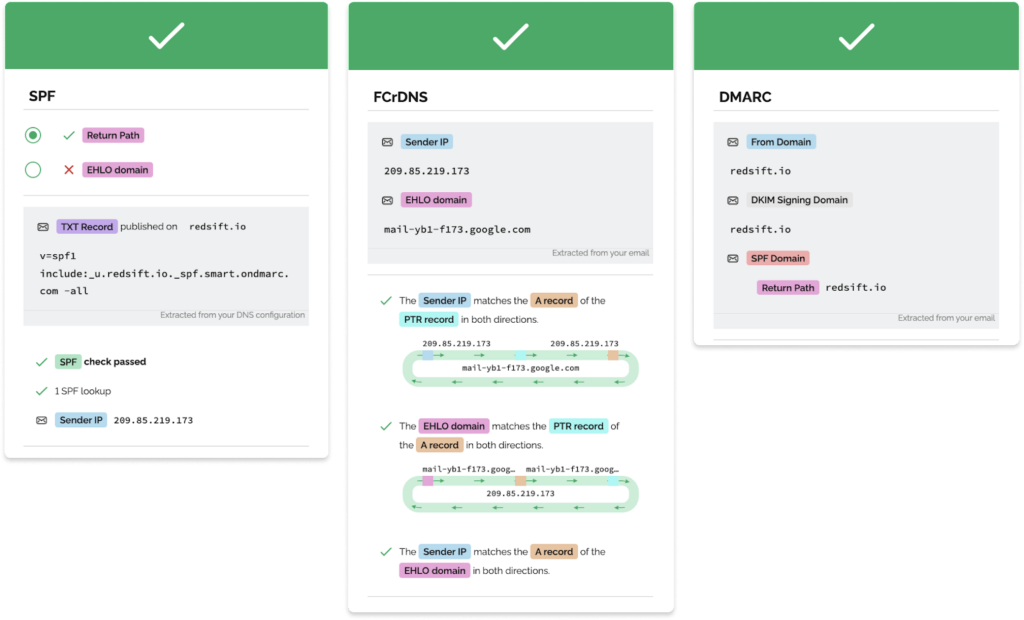
If you are willing to get into the weeds a bit more, there are other tools. Check out our tooling chapter here.
Step 3: Get specific in your ask to your security team
With your Red Sift Investigates results in hand, you are in the perfect position to get clear on what you need to do to authenticate your domain.
If you are confused about the errors you are seeing – or just want to make it super clear for your security team – check out our matrix which gives you more details on why you might be seeing errors. From there, you are well positioned to put forth an ask to your security team.
For example, if your Red Sift Investigate results look like this:
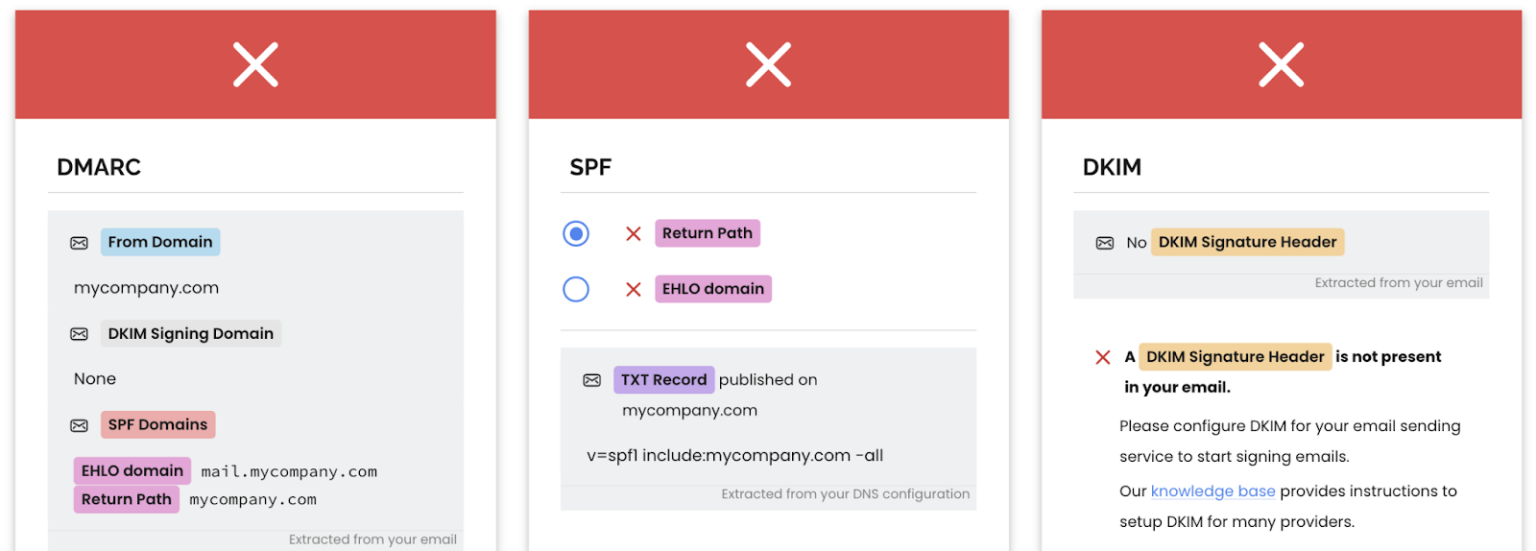
And you see in the matrix that this means “A DMARC record is required.”
You can go to your security team and show them both and ask how you can work together to make sure you can get the proper record in place.
📢Don’t forget – you need to test all of your email-sending services. Just because your Hubspot test email passes, doesn’t mean your Mailchimp email will.
Step 4: Tie your ask to business outcomes
As we mentioned earlier, your security team has a long list of priorities, and this may not be at the top. But now is the time to take action, and clear communication can make all the difference.
A little research will help build a strong case. Consider:
- How much revenue did email generate last year?
- How many new opportunities or customers came from email as the last touch?
- What would poor deliverability cost the business?
- What percentage of the database would be unreachable if these requirements aren’t met?
Framing the request around business impact gives security teams a clear reason to act quickly.
Are other ESPs making changes to their authentication requirements?
Yes. In September 2025, French email service provider Laposte.net raised its authentication standards. As of 2026, authentication requirements are becoming standard across email service providers globally.
100% of unauthenticated emails—those lacking SPF, DKIM, or DMARC—will be redirected to the spam folder. In other words, SPF, DKIM, and DMARC will no longer be optional for senders who want to maintain inbox placement.
We will continue to monitor updates from Laposte.net and other email service providers, and this guide will be updated as new requirements are announced.
Where to go from here?
Don’t get caught out by the requirements. Take the first step today with Red Sift Investigate and reach out to your security team to get the conversation going. We are here to help, and you can always talk to a Red Sift expert to help begin your journey to Microsoft, Google, and Yahoo bulk sender compliance.
Check your bulk sender compliance with Red Sift Investigate. All you need to get going is to send a test email!