SPF Checker (Free)
SPF Record Lookup & Validation

Instantly look up and validate your SPF record. We test for syntax errors, duplicate records, and “too many DNS lookups,” then show exactly how to fix issues. It’s fast and free.
spf checker image
Common SPF failure examples
alert-triangle (1)
Too many DNS lookups

SPF allows a maximum of 10 DNS lookups. Exceed 10 and receiving servers return a PermerError, failing every email you send.

A domain using Google Workspace, Salesforce, and Mailchimp HubSpot can hit this without realizing it.

list-ordered
Multiple SPF records

You can only have one SPF TXT record per domain. If you have two, receiving servers return a PermerError.

This typically happens after migrating email providers when the old record is left behind. Delete the duplicate and merge everything.

x-circle
Syntax errors

A misplaced space or typo can break your entire record.

Common examples include inlcude instead of include, or a record that doesn't start with v=spf1. The SPF Checker flags these in red and shows exactly where the issue sits.

check-circle-2
Overly permissive ~all or ?all

~all (softfail) and ?all (neutral) don't hard-reject unauthorized senders — mail still gets delivered.

If your sender list is stable, use -all.

Free resource

Guide
SubdoMailing guide image

The complete guide to SubdoMailing

“SubdoMailing,” or subdomain-based emailing, is an advanced attack method that takes advantage of blind spots in DMARC enforcement. By sending messages from legitimate-looking subdomains that pass authentication checks, cybercriminals can convincingly spoof trusted organizations and mislead recipients.

Using this guide, learn about:

  • The severity of SubdoMailing and why you should take action
  • Dangling DNS records and how your organization could be at risk
  • How to secure your domain today
SubdoMailing guide image

FAQs

What is the SPF Checker?

SPF stands for Sender Policy Framework. It’s an email authentication protocol that acts as a whitelist, outlining the senders authorized to send emails on your behalf. Its aim is to prevent email forgery.

What is SPF and why is it important for email security?

SPF stands for Sender Policy Framework. It’s an email authentication protocol that acts as a whitelist, outlining the senders authorized to send emails on your behalf. Its aim is to prevent email forgery.

What is an SPF record?

DNS TXT record  that tells receiving mail servers which IPs/hosts are authorized to send email for a domain.

What does an SPF record actually look like?

v=spf1 include:_spf.google.com include:spf.protection.outlook.com ip4:203.0.113.5 -all

It starts with v=spf1, lists authorized senders in the middle, and ends with an all qualifier. One record per domain — no exceptions.

What is the SPF tree visualization, and how can it help me understand my SPF record better?

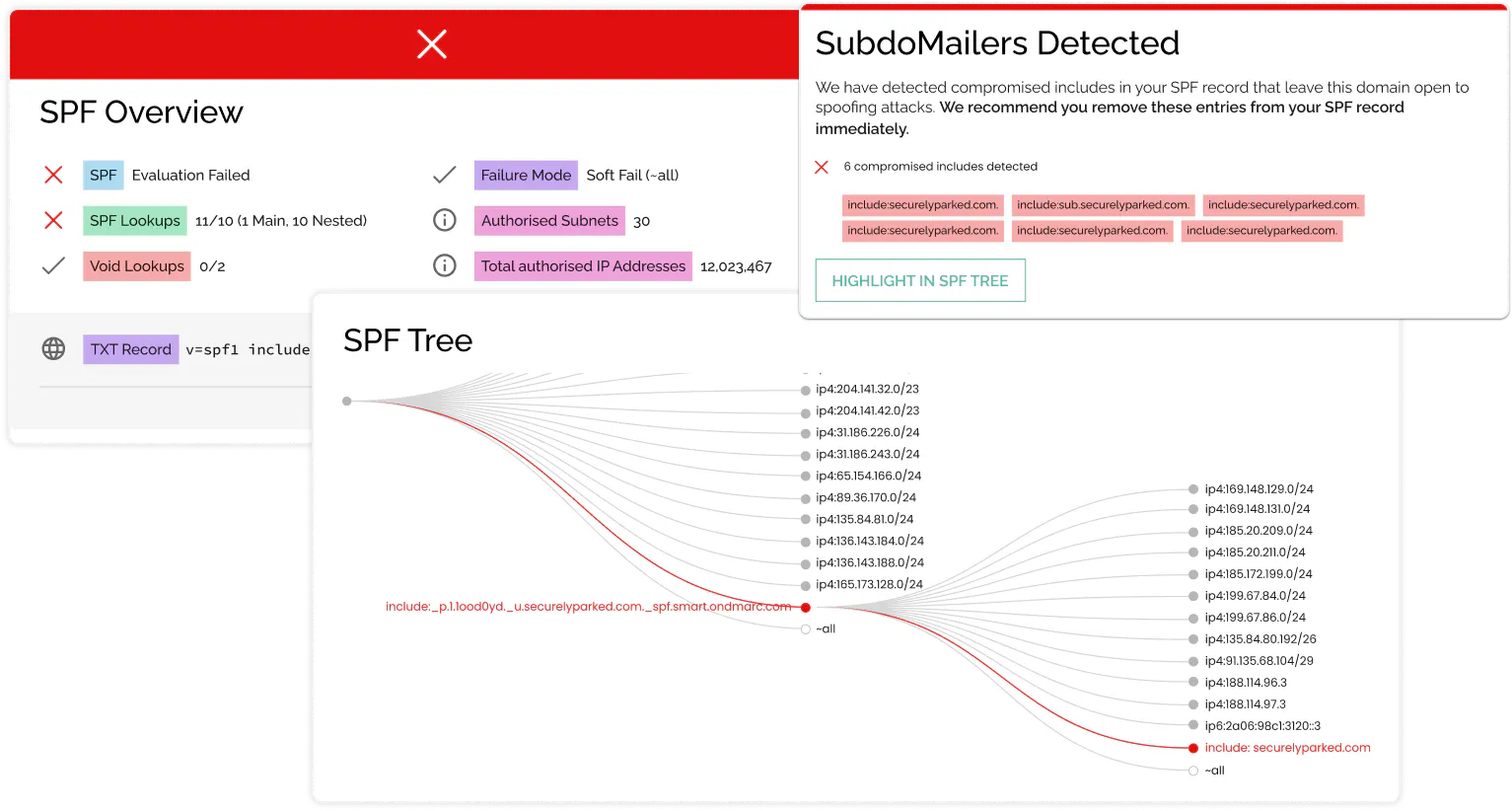
The SPF tree visualization provided by the SPF Checker illustrates each step of SPF record resolution, showing how each mechanism is evaluated and whether it results in a pass, fail, or neutral outcome. This visualization helps users understand the hierarchy of SPF mechanisms and identify potential issues or misconfigurations within the SPF record.

What is the SubdoMailing attack and how can the SPF Checker help?

On Feb 27th, 2024, researchers at Guardio discovered a massive email ad fraud campaign based on thousands of hijacked domains and subdomains. You can read more about the SubdoMailing attack and how to protect yourself here.

The Red Sift SPF record check tool detects if your SPF record contains compromised includes that leave your domain open to spoofing attacks. The dynamic visualization of the SPF tree allows you to highlight where the poisoned includes exist. If compromised includes are discovered, we recommend you remove these entries from your SPF record immediately.

Why should I check my domain's SPF configuration?

Running an SPF check on your domain's SPF configuration ensures that it is correctly set up to authenticate emails sent from your domain, reducing the likelihood of your emails being marked as spam or being rejected by recipient servers.

How can I interpret the results provided by the SPF Checker?

Depending on the SPF configuration of the specified domain, information messages are displayed with the option to "highlight in SPF tree".

  • Green indicates information only (e.g., well-known provider).
  • Yellow signifies warnings only (e.g., void lookup).
  • Red denotes issues (e.g., permanent DNS error).
Can the SPF Checker identify errors in nested includes from third-party records?

Yes, the SPF Checker can identify errors in nested includes from third-party records by analyzing each included SPF record within the hierarchy. This allows users to detect and address issues in third-party SPF configurations that may impact their own domain's email authentication.

How can I access my domain's SPF record?

You can access your domain's SPF record by querying the DNS records for your domain using tools like nslookup or dig. Alternatively, you can use online SPF lookup tools or access the DNS management interface provided by your domain registrar or hosting provider.

What is a void lookup, and why is it a concern for SPF configuration?

A void lookup occurs when a mechanism in the SPF record results in a DNS query that returns no result, indicating a misconfiguration or an invalid entry. Void lookups can lead to SPF authentication failures and should be addressed to ensure the integrity of the SPF configuration.

How can I fix syntax errors in my SPF record?

Syntax errors in an SPF record can be fixed by reviewing the SPF syntax guidelines and ensuring that the record is correctly formatted. Common syntax errors include missing or misplaced mechanisms, invalid characters, and incorrect spacing. Once identified, syntax errors can be corrected using the DNS management interface provided by your domain registrar or hosting provider.

What are SPF mechanisms, and how do they affect email authentication?

SPF mechanisms are components of an SPF record that specify which mail servers are authorized to send emails on behalf of a domain. Mechanisms include IP addresses, domain names, and qualifiers that define how the mechanism should be interpreted. By configuring appropriate mechanisms in the SPF record, domain owners can control which mail servers are allowed to send emails using their domain name, thereby enhancing email authentication and security.

How do I validate my SPF record?

Run a lookup and ensure one record, valid syntax, ≤10 DNS lookups.

Why does my SPF fail?

Typically multiple records, syntax issues, or too many “include” lookups.

Why is there a 10 DNS lookup limit?

RFC 7208 caps SPF at 10 DNS-querying mechanisms to protect receiving servers from overload. Each include, a, mx, ptr, and redirect counts toward that limit. Go over and SPF fails for every email, including legitimate ones. The SPF Checker shows your current lookup count and where it's coming from.

What's the difference between ~all and -all?

-all (hard fail) rejects email from unauthorized senders outright. ~all (softfail) accepts it but typically routes it to spam. ?all (neutral) makes no statement at all and provides no protection. For production domains, -all is the right setting. Use ~all only while you're still identifying all your legitimate senders.

Can I have SPF on a subdomain?

Yes, and you should. SPF on yourdomain.com doesn't cover mail.yourdomain.com or newsletter.yourdomain.com. Each sending subdomain needs its own record. Subdomains without SPF are open to spoofing.

investigate cards

Get an instant analysis of your email security setup with our free Investigate tool

SPF is just one part of your email security setup. Use our Investigate tool to check if your DMARC, DKIM, MTA-STS, and other important protocols are set up correctly, and get actionable steps on how to fix any issues.

Investigate Now