Guía Red Sift de configuración de protocolos de correo electrónico
- Learn more about DKIM
- Why is DKIM key rotation important?
- How often should DKIM keys be rotated?
- What’s a long DKIM Key?
- What is DKIM canonicalization?
- What is a DKIM selector?
- What is the l= tag in DKIM?
- What are the security concerns around using the l= tag in DKIM?
- What is DKIM Header oversigning?
- What is a DKIM replay attack?
- How does DKIM help with forwarded mail?
- Can an email contain more than one DKIM signature i.e. be DKIM signed multiple times?
- How does ARC come into play when DKIM or DMARC fail?
- Common DKIM misconfigurations
- DKIM recommendations summary
- Technical DKIM configuration tips
- Generating 2048 bits DKIM public and private keys using OpenSSL on a Mac
- Learn more about DKIM
- Why is DKIM key rotation important?
- How often should DKIM keys be rotated?
- What’s a long DKIM Key?
- What is DKIM canonicalization?
- What is a DKIM selector?
- What is the l= tag in DKIM?
- What are the security concerns around using the l= tag in DKIM?
- What is DKIM Header oversigning?
- What is a DKIM replay attack?
- How does DKIM help with forwarded mail?
- Can an email contain more than one DKIM signature i.e. be DKIM signed multiple times?
- How does ARC come into play when DKIM or DMARC fail?
- Common DKIM misconfigurations
- DKIM recommendations summary
- Technical DKIM configuration tips
- Generating 2048 bits DKIM public and private keys using OpenSSL on a Mac
Learn more about DKIM
Why is DKIM key rotation important?
You can rotate DKIM keys by simply replacing the old pair with a new one to authenticate DKIM emails. If a threat actor steals or deciphers your private key, they won’t be able to use it for long if you practice regular DKIM key rotation.
In addition, regularly updating your DKIM keys increases your domain’s email deliverability rate.
How often should DKIM keys be rotated?
It’s generally suggested to rotate DKIM keys every 6 to 12 months. Frequent rotation stops hackers from intercepting and decoding your cryptographic keys. Less frequent rotation (say, once every couple of years) makes your domain more susceptible to the risk of intercepted or decoded keys.
What’s a long DKIM Key?
Some DNS editors can receive errors when DKIM keys or other TXT entries are longer than 255 characters.
To resolve this issue, you can enter your DKIM key by breaking it up into pieces on a single TXT entry.
For example, if your DKIM key is:
"v=DKIM1; k=rsa; p=abcdefghijklmnopqrstuvwxyzabcdefghijklmnopqrstuvwxyzabcdefghijklmnopqrstuvwxyzabcdefghijklmnopqrstuvwxyzabcdefghijklmnopqrstuvwxyzabcdefghijklmnopqrstuvwxyzabcdefghijklmnopqrstuvwxyzabcdefghijklmnopqrstuvwxyzabcdefghijklmnopqrstuvwxyzabcdefghijklmnopqrstuvwxyzabc"
You can enter it as:
"v=DKIM1; k=rsa; p=abcdefghijklmnopqrstuvwxyzabcdefghijklmnopqrstuvwxyzabcdefghijklmnopqrstuvwxyzabcdefghijklmnopqrstuvwxyzabcdefghijklmnopqrstuvwxyz" "abcdefghijklmnopqrstuvwxyzabcdefghijklmnopqrstuvwxyzabcdefghijklmnopqrstuvwxyzabcdefghijklmnopqrstuvwxyzabcdefghijklmnopqrstuvwxyzabc"
You can divide them at arbitrary places. The double quote enclosed parts should be separated by a single space character, not a new line.
What is DKIM canonicalization?
Canonicalization is a process whereby the headers and body of an email are converted to a canonical standard form before being DKIM signed. This can be thought of as converting data into a standard canonical form.
Some mail systems, such as forwarders, modify emails in transit that can potentially invalidate the DKIM signature applied. While some DKIM signers may accept minor mail modifications, others may be more strict and require stricter canonicalization.
Two canonicalization algorithms have been created to satisfy mild modification to a message and almost no modification to a message before signing. The two canonicalization algorithms are relaxed and simple respectively.
From DKIM’s perspective, the headers and body of an email are separate and canonicalization algorithms are specified for both, one for the headers and another for the body.
They are represented in the format of canonicalization/canonicalization for the header and body respectively. If no canonicalization is specified then simple is used for both headers and body, so it would look like this: simple/simple.
The simple/simple canonicalization is the stricter of the two and allows for almost no modification to the message header and body. However, this can affect the DKIM signature being invalidated by some forwarders as the email passes through them. Many of the issues with DKIM being invalidated during forwarding can be solved if the canonicalization is changed to relaxed/relaxed to allow for mild modifications to the emails.
What is a DKIM selector?
A DKIM selector is a string that points to a specific DKIM public key record in your DNS. It is specified as s= tag in the DKIM-Signature header field and can be found in the technical headers of an email.
Validation on the receiver side uses the selector in combination with the signing domain in order to carry out a DNS query and find the public key in your DNS.
For example:
“selector”._domainkey.yourdomain
When the receiver retrieves the public key it uses it to verify the DKIM signature.

No two services should use the same selector. For example, if you are sending emails from a number of services on behalf of your domain such as Google, Mailchimp, Salesforce, and Sendgrid, each one must use a unique key and selector in your DNS. If the selectors were the same the recipient would not be able to tell which key to use to decipher a particular email.
What is the l= tag in DKIM?
The l= tag in DKIM specifies the length of the message body that should be included in the DKIM hashing and signing process. This means that only the specified portion of the message body is signed, while the remainder is not included in the cryptographic signature.
This tag is optional. If it is not used, the entire message body is included in the signature by default.
What are the security concerns around using the l= tag in DKIM?
When the l= tag is used in DKIM, only a specified portion of the message body is included in the cryptographic signature, leaving the rest unsigned. This creates a security risk, as attackers can modify the unsigned portion of the message without invalidating the DKIM signature.
This vulnerability means that an attacker could intercept a legitimate email from a reputable sender, append malicious content to the unsigned part of the message, and resend it to a recipient who trusts the sender. Such an attack could damage the reputation of the sending domain and potentially deceive recipients.
To mitigate this risk, it is recommended not to use the l= tag in your DKIM signing process. Additionally, audit your vendors to ensure they are not including this tag when sending emails on your behalf.
What is DKIM Header oversigning?
DKIM is used to sign specific headers or parts of the email body, such as the "From," "Subject," and other headers, to verify the identity of the sender and ensure the integrity of the message. If a signed header is modified after being sent, the DKIM verification will fail.
Attackers may attempt to inject additional headers into an email or modify existing ones for malicious purposes. Oversigning common headers, such as "From," "Subject," "Reply-To," etc., can help protect your emails from manipulation and replay attacks. Oversigning means that you include multiple instances of the same header, effectively signing each one to prevent tampering.
By sending a test email to Red Sift’s Investigate tool, you will be able to see what headers are DKIM signed in your email and if you are oversigning.
What is a DKIM replay attack?
A DKIM replay attack is a type of email attack in which an attacker takes a legitimate, DKIM-signed email and resends it to multiple recipients. The attacker exploits the DKIM signature, which verifies the email's authenticity and integrity, to benefit from the original sender's reputation. This increases the likelihood that the replayed email will bypass spam filters and land in the recipients' inboxes, as it appears to come from a trusted source.
How does DKIM help with forwarded mail?
DKIM helps with forwarded mail by providing a mechanism to verify the authenticity and integrity of an email, even after it has been forwarded. Forwarding can often alter email headers, which can cause issues with other email authentication methods like SPF (Sender Policy Framework).
Without DKIM, forwarded emails may fail to reach the recipient's inbox, especially if the sender's domain is protected by a strict DMARC (Domain-based Message Authentication, Reporting, and Conformance) policy. This is because SPF authentication often fails during forwarding, and without both SPF and DKIM, a DMARC policy of p=reject will instruct the recipient's server to reject the email.
It is strongly advised not to set a DMARC policy of "reject" without first implementing an aligned DKIM signature for all your email sending systems. This ensures that at least one authentication mechanism remains intact when SPF fails.
However, it's important to note that DKIM can also fail when an email is forwarded, particularly if the forwarder modifies any of the DKIM-signed headers or the body of the email. This can happen due to email security gateways, external disclaimer banners, or other modifications introduced during the forwarding process.
Can an email contain more than one DKIM signature i.e. be DKIM signed multiple times?
Yes, an email can contain multiple DKIM signatures, and this is quite normal. This typically occurs when an email passes through different systems that each apply their own DKIM signature. For example, an email service provider (ESP) might add a DKIM signature to track reputation feedback, and another DKIM signature might be added when the email is sent from one system to another on its way out to the internet. If both systems are configured to DKIM sign emails, the email will end up with multiple DKIM signatures.
It's important to note that one of the signatures may fail (often the first one, if the email is modified between the initial and subsequent signing), but as long as at least one signature passes verification, the DKIM check will be considered successful.
How does ARC come into play when DKIM or DMARC fail?
As mentioned earlier, DKIM may fail when an email is forwarded. ARC (Authenticated Received Chain) addresses the limitations of DKIM and DMARC in scenarios involving email forwarding and mailing lists by preserving the original authentication results through a sequence of cryptographic signatures, creating a chain of custody.
ARC helps ensure that legitimate emails can be trusted and delivered, even if modifications by intermediaries cause DKIM or DMARC failures. It does this by allowing the forwarding server to attest to the original authentication results and the integrity of the message when it was first received.
However, the use of ARC relies on the email forwarder to implement it, establishing this chain of custody. Even if an email passes ARC, it does not necessarily guarantee that the email will be trusted or delivered to the recipient's inbox. The final decision lies with the receiving system, which determines whether to trust the established chain of custody.
Common DKIM misconfigurations
- Using Weak or Deprecated Cryptographic Algorithms: Avoid using DKIM keys that are less than 1024 bits. A 2048-bit key is recommended for stronger security. Additionally, ensure you use up-to-date cryptographic algorithms, such as
rsa-sha256. - Not Splitting Longer Keys Correctly in DNS: When publishing a 2048-bit key in DNS, it may be necessary to split the key into multiple DNS records if your DNS host does not automatically handle this. Failure to do so can result in DKIM verification failures. Refer to the specific guidance or examples provided for splitting keys correctly.
- Enabling DKIM in a Third-Party System Without Publishing the Corresponding Public Key: DKIM relies on a private/public key pair. The sender (e.g., a third-party vendor) holds the private key, which is used to sign outgoing emails. It is crucial to publish the corresponding public key in your domain's DNS records, provided by the vendor, to enable proper DKIM verification.
- Missing Required Tags in a DKIM Record: Ensure that your DKIM record begins with
v=DKIM1;. This is a required tag that identifies the record as a DKIM record. - Using the Wrong Record Type: Make sure to publish your DKIM record using the correct DNS record type, such as TXT or CNAME, as specified by the third-party sender. Some providers may require a TXT record for DKIM, while others might use CNAME. Additionally, some vendors, like Microsoft 365 or Amazon SES, may provide multiple DKIM records to facilitate easy key rotation and management.

DKIM recommendations summary
- Oversign email headers.
- Rotate DKIM keys at least once a year.
- Use strong keys (at least 1024-bit) and up-to-date algorithms.
- Avoid using the l= tag.
- Remove unused DKIM records from DNS.
- Implement DMARC with DKIM for better insight and protection.
Technical DKIM configuration tips
Generating 2048 bits DKIM public and private keys using OpenSSL on a Mac
Learn how to generate 2048 bits DKIM public and private keys using the Mac terminal and create a DNS record.
How to generate the private and public keys
- Open the terminal and type
openssl - To generate a private key type:
openssl genrsa -out private.key 2048 - To generate a public key from the private key type:
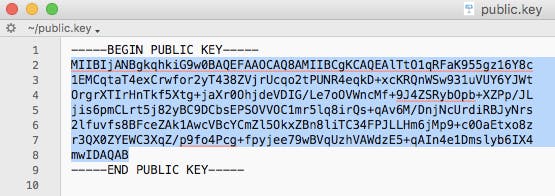
openssl rsa -in private.key -pubout -out public.key - Find the folder that contains your public key and open it. It should look something like the image below.
- Manually convert the highlighted text above to a single line ie. remove the spaces between new lines.
How to create the DNS record
The generated 2048-bit DKIM public key is too long to fit into a single TXT DNS record. A DNS record can be up to 255 characters. Therefore your public key will need to be split into two separate TXT records using quotes and slash or brackets and quotes as shown below.
Note: this depends on your DNS provider.
TXT"part one" \ "part two"TXT( "part one" "part two" )
To create the DNS record you will have to specify the Name, Type, and Value of the DNS record.
The DNS record Name will look like this:
selector._domainkey.domain
Where the selector is defined by you and can be called anything, for example, the date, device, or service that will sign the emails.
For example:
20180719._domainkey.redsift.io
The DNS record Type is TXT.
The DNS record Value should look like the examples below. The part in bold is copied from the generated public key file and remember that you will need to split the public key into two records.
Splitting examples
Example 1 using quotes
TXT record 1:
“v=DKIM1; k=rsa; p=MIIBIjANBgkqhkiG9w0BAQEFAAOCAQ8AMIIBCgKCAQEAlTtO1qRFaK955gz16Y8c1EMCqtaT4exCrwfor2yT438ZVjrUcqo2tPUNR4eqkD+xcKRQnWSw931uVUY6YJWtOrgrXTIrHnTkf5Xtg+jaXr0OhjdeVDIG/Le7oOVWncMf+9J4ZSRybOpb+XZPp/JLjis6pmC”
TXT record 2:
“Lrt5j82yBC9DCbsEPSOVVOC1mr5lq8irQs+qAv6M/DnjNcUrdiRBJyNrs2lfuvfs8BFceZAk1AwcVBcYCmZl5OkxZBn8liTC34FPJLLHm6jMp9+c0OaEtxo8zr3QX0ZYEWC3XqZ/p9fo4Pcg+fpyjee79wBVqUzhVAWdzE5+qAIn4e1Dmslyb6IX4mwIDAQAB”
Example 2 using brackets and quotes
TXT record 1:
(“v=DKIM1; k=rsa; p=MIIBIjANBgkqhkiG9w0BAQEFAAOCAQ8AMIIBCgKCAQEAlTtO1qRFaK955gz16Y8c1EMCqtaT4exCrwfor2yT438ZVjrUcqo2tPUNR4eqkD+xcKRQnWSw931uVUY6YJWtOrgrXTIrHnTkf5Xtg+jaXr0OhjdeVDIG/Le7oOVWncMf+9J4ZSRybOpb+XZPp/JLjis6pmC”
TXT record 2:
“Lrt5j82yBC9DCbsEPSOVVOC1mr5lq8irQs+qAv6M/DnjNcUrdiRBJyNrs2lfuvfs8BFceZAk1AwcVBcYCmZl5OkxZBn8liTC34FPJLLHm6jMp9+c0OaEtxo8zr3QX0ZYEWC3XqZ/p9fo4Pcg+fpyjee79wBVqUzhVAWdzE5+qAIn4e1Dmslyb6IX4mwIDAQAB”)
Preguntas frecuentes: Guía de configuración de protocolos de correo electrónico
Antes de DMARC, en los registros SPF se utilizaba a menudo el mecanismo “-all” para imponer políticas estrictas a los remitentes. Sin embargo, las recomendaciones actuales del sector para 2026 favorecen “~all” para equilibrar la seguridad con la entregabilidad y evitar el rechazo innecesario de correos legítimos que fallen SPF pero pasen DKIM y DMARC.
La razón es que “~all”, combinado con DMARC (en p=reject), permite igualmente que los emails no autenticados no se entreguen cuando SPF y DKIM fallan, sin bloquear correos legítimos, mejorando así la entregabilidad global.
Las especificaciones DMARC (RFC 7489) indican que un prefijo “-” en el mecanismo SPF del remitente –como “-all”– puede implicar el rechazo de un email ya en la fase inicial, es decir, antes de que se aplique DMARC. Utiliza “-all” solo en dominios inactivos que nunca envían correo. DMARC no distingue entre Soft Fail y Hard Fail en SPF: considera ambos simplemente como un fallo de SPF.
DMARC requiere no solo que SPF o DKIM resulten positivos, sino también que al menos uno de los dominios utilizados con SPF o DKIM coincida con el dominio presente en la cabecera From. Un correcto alineamiento es fundamental en 2026 para la entrega de los correos, ya que los principales proveedores ahora exigen esta comprobación.
Para SPF, el alineamiento significa que la verificación de MAIL FROM/Return-PATH ha sido exitosa y la parte de dominio de MAIL FROM/Return-PATH coincide con el dominio de la dirección From. En modo Strict ambos deben ser idénticos; en modo Relaxed se aceptan también los subdominios si pertenecen al mismo organizational domain.
Ejemplo: si MAIL-FROM/RETURN-PATH es @ondmarc.com y el From-header es @knowledge.ondmarc.com, no están alineados en modo Strict, pero DMARC los consideraría válidos en modo Relaxed.
Un informe agregado DMARC recoge información sobre el estado de autenticación de los mensajes enviados en nombre de un dominio. Se trata de un informe bounce en XML que resume qué correos han pasado o fallado SPF y DKIM. Permite a los propietarios del dominio tener una visión precisa de las fuentes que envían correos en su nombre y el resultado (política del destinatario).
Los destinatarios utilizan la etiqueta 'rua' del registro DMARC para enviar estos reportes. Puedes definir la frecuencia usando la etiqueta ri en el registro DMARC (valor predeterminado: 86400 segundos, es decir, 24h). Los reportes forenses aportan mucho más detalle sobre cada fallo de autenticación. Los datos personales se eliminan, pero toda la información útil para resolver incidencias, como cabeceras SPF/DKIM, dirección completa del remitente y asunto, se transmite.
La dirección para recibir los informes forenses DMARC se indica mediante la etiqueta 'ruf'. No todos los sistemas soportan este tipo de reportes. Red Sift OnDMARC es una de las pocas soluciones que puede recibir reportes forenses, gracias a su colaboración con Yahoo.
Una macro SPF es un mecanismo en los registros SPF que permite definir conjuntos reutilizables de direcciones IP. Las macros SPF aportan mayor flexibilidad y facilidad de mantenimiento: puedes definir conjuntos complejos de IP en un único mecanismo y referenciarlos en varios registros. Por ejemplo, en lugar de enumerar cada IP autorizada, puedes usar una macro como “%{i}”, que recoge la IP saliente del correo. De este modo puedes gestionar fácilmente grandes listas de IP sin sobrepasar el límite de consultas SPF y hacer menos visibles las autorizaciones IP durante las consultas DNS.
Dependiendo de la estructura de la macro en el registro SPF, una macro que no se expande puede provocar errores SPF o un resultado neutral (?all). Si el envío de correos legítimos depende de las macros SPF, estas pueden causar más fallos o etiquetar como sospechoso el tráfico hacia sistemas que dependen de SPF.
Mail Transfer Agent Strict Transport Security (MTA-STS) es un estándar para el cifrado de los mensajes entre dos servidores de correo. Indica a los servidores remitentes que los emails deben entregarse solo a través de una conexión segura mediante Transport Layer Security (TLS), protegiendo así contra intentos de interceptación por parte de ciberdelincuentes.
La adopción de MTA-STS ha crecido rápidamente y en 2026 la seguridad del transporte será considerada esencial para la protección del correo en tránsito. Para activar MTA-STS en un dominio receptor, es necesario declarar el soporte mediante DNS y hacer disponible un archivo de políticas en el propio sitio web.
MTA-STS debe activarse con cautela para no provocar bloqueos accidentales. Se recomienda empezar por el modo Test: así, gracias a los reportes TLS, puedes identificar y solucionar errores antes de pasar al modo strict. Este enfoque gradual probablemente será el estándar para la protección del email en tránsito en 2026.
SMTP TLS Reporting (TLS-RPT), según RFC8460, sirve para reportar problemas de conectividad TLS desde los servidores MTA remitentes. Al igual que con DMARC, aquí también se reciben reportes por correo cuando los problemas TLS afectan la entrega. Los informes incluyen las políticas MTA-STS detectadas, estadísticas de tráfico, conexiones fallidas y motivos de error.
Con la función MTA-STS en Red Sift OnDMARC no tendrás que preocuparte por implementaciones complejas. Basta con añadir los Smart Record MTA-STS proporcionados por OnDMARC a tu DNS y Red Sift se encarga del hosting del archivo de política, gestión del certificado SSL y el envío automático de reportes TLS de incumplimiento. En 2026, el MTA-STS alojado es cada vez más un estándar previsto en plataformas modernas de DMARC, facilitando así la integración del cifrado en el transporte.
Según RFC 7671, DANE (DNS-based Authentication of Named Entities) es un nuevo estándar de Internet para establecer comunicaciones TLS entre cliente y servidor sin depender de las autoridades de certificación (CA) tradicionales.
En el modelo actual, cualquier CA puede emitir un certificado para cualquier dominio. DANE adopta otro enfoque, aprovechando la infraestructura DNSSEC (Domain Name System Security Extensions) para asociar criptográficamente un nombre de dominio a un certificado. DANE se basa en el protocolo DNSSEC existente para garantizar la autenticidad e integridad de la recepción.
DANE además introduce un nuevo tipo de registro DNS, TLSA, que señala al cliente el soporte de TLS por parte del servidor. Se recomienda implementar tanto MTA-STS como DANE. DANE es obligatorio para muchas entidades públicas, en particular en la UE.
MTA-STS y DANE sólo son eficaces si también el servidor remitente los soporta; muchos implementan sólo uno de los dos. Activar ambos aumenta la seguridad general. En 2026, las organizaciones suelen adoptar primero MTA-STS para máxima compatibilidad y después implementan DANE para un nivel de seguridad superior cuando resulta necesario.
La política para subdominios permite a los administradores proteger de forma diferenciada distintos dominios y subdominios, dependiendo del estado de implementación de DMARC. Por ejemplo, si todos los servicios de envío asociados al dominio principal ya están protegidos con SPF y DKIM, puedes establecer una política DMARC p=reject en el dominio principal y p=none en los subdominios, o viceversa.
Si un servicio de envío no soporta DMARC (es decir, no implementa SPF o DKIM), puedes asignarle un subdominio separado con su propia política DMARC, sin comprometer la protección de los demás dominios. Esto permite distribuir el tráfico entre distintos subdominios y protegerlos por separado según las necesidades.