La PKI pubblica e i certificati digitali offrono una base di sicurezza accettabile per la maggior parte delle proprietà internet, ma alcune comportano un rischio molto più elevato rispetto ad altre. Proprietà come la pagina di login della tua applicazione, i flussi di pagamento, i domini aziendali e qualsiasi elemento che potrebbe danneggiare il tuo brand se impersonato sono obiettivi privilegiati per gli attaccanti. Queste proprietà devono essere protette costruendo attivamente difese utilizzando tecnologie come Certificate Transparency (CT) e CAA. Sebbene abbiamo già trattato in dettaglio l'High-Assurance CT, volevamo concentrarci sugli aspetti pratici del rilevamento delle emissioni non autorizzate, dell'applicazione dei meccanismi di prevenzione disponibili e della configurazione del monitoraggio ad alta affidabilità con Red Sift Certificates.
Cos'è Certificate Transparency?
Certificate Transparency (CT) è uno standard aperto che richiede alle Autorità di Certificazione (CA) pubblicamente fidate di registrare ogni certificato emesso in log pubblicamente verificabili e di sola aggiunta. Di conseguenza, qualsiasi certificato emesso per il tuo dominio è visibile a chiunque.
CT è stato progettato per affrontare una debolezza fondamentale della PKI pubblica: qualsiasi CA presente nel trust store può tecnicamente emettere un certificato per qualsiasi dominio. Non impedisce questo, ma rende rilevabili le emissioni non autorizzate. Red Sift acquisisce ed elabora i log CT dal 2017, costruendo uno dei più completi archivi di dati per la scoperta dei certificati disponibili.
I fallimenti della PKI pubblica non sono teorici; consulta la nostra cronologia degli attacchi contro le PKI pubbliche per scoprire incidenti che CT e CAA avrebbero rilevato.
Livello 1: Inizia con una policy CAA di base
La prima linea di difesa è la prevenzione, e questa inizia con una policy CAA (Certification Authority Authorization) nel DNS. Una policy CAA ti permette di dichiarare quali CA sono autorizzate a emettere certificati per il tuo dominio. Senza una policy, qualsiasi CA può emettere un certificato per le tue proprietà. Anche una configurazione CAA di base riduce drasticamente la tua superficie di attacco.
Base consigliata: policy CAA di base con impostazioni di monitoraggio CT predefinite.
Definire una policy CAA. Ora configuriamo una policy CAA con Red Sift Certificates. Prima di bloccare qualsiasi cosa, scopri chi sta attualmente emettendo certificati per i tuoi domini. Altrimenti, un nuovo record potrebbe interrompere un'emissione legittima da un giorno all'altro. Il filtro Issuer nella pagina Certificates mostra questo immediatamente. Filtrando su "Hostnames contiene redsift.com", ad esempio, restituisce Let's Encrypt (114), Google Trust Services (34), Sectigo (24) e Amazon (4).
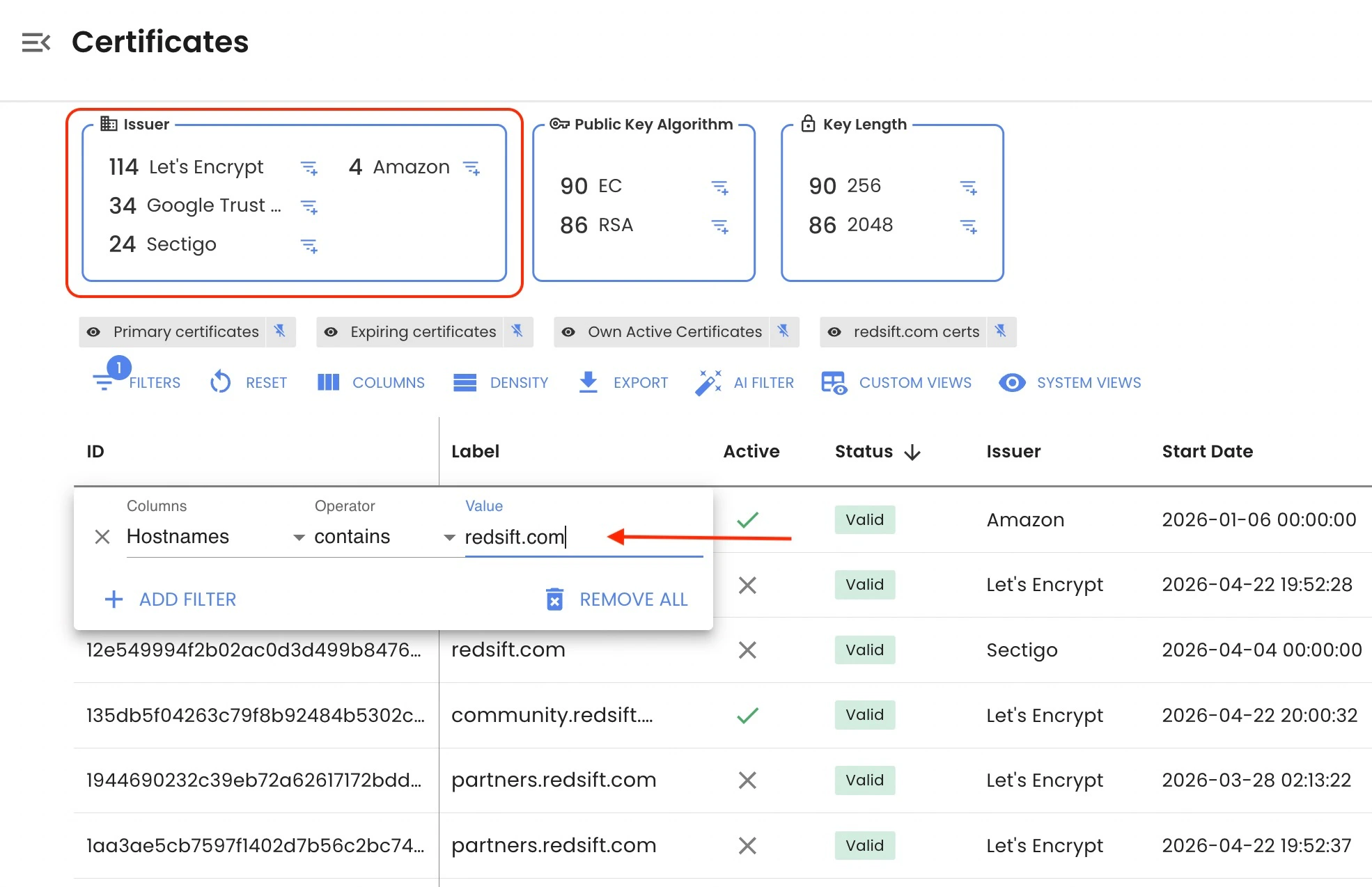
Quell'elenco si traduce direttamente in una policy CAA che devi configurare sul tuo record DNS:
redsift.com.  CAA  0  issue      "letsencrypt.org"
redsift.com.  CAA  0  issue      "pki.goog"
redsift.com.  CAA  0  issue      "sectigo.com"
redsift.com.  CAA  0  issue      "amazon.com"
redsift.com.  CAA  0  issuewild  "letsencrypt.org"
redsift.com.  CAA  0  issuewild  "pki.goog"
redsift.com.  CAA  0  issuewild  "sectigo.com"
redsift.com.  CAA  0  iodef      "mailto:security@redsift.com"
issue copre i certificati normali, e issuewild copre i wildcard. Restringi l'elenco wildcard solo alle CA che utilizzi effettivamente per l'emissione wildcard; il filtro "wildcard" in Red Sift Certificates, combinato con un filtro "hostnames", mostra il tuo utilizzo attuale dei wildcard. Hai bisogno di aiuto con i domini identificativi? Puoi usare questo generatore CAA per trovare il dominio identificativo corretto per ciascuna CA.
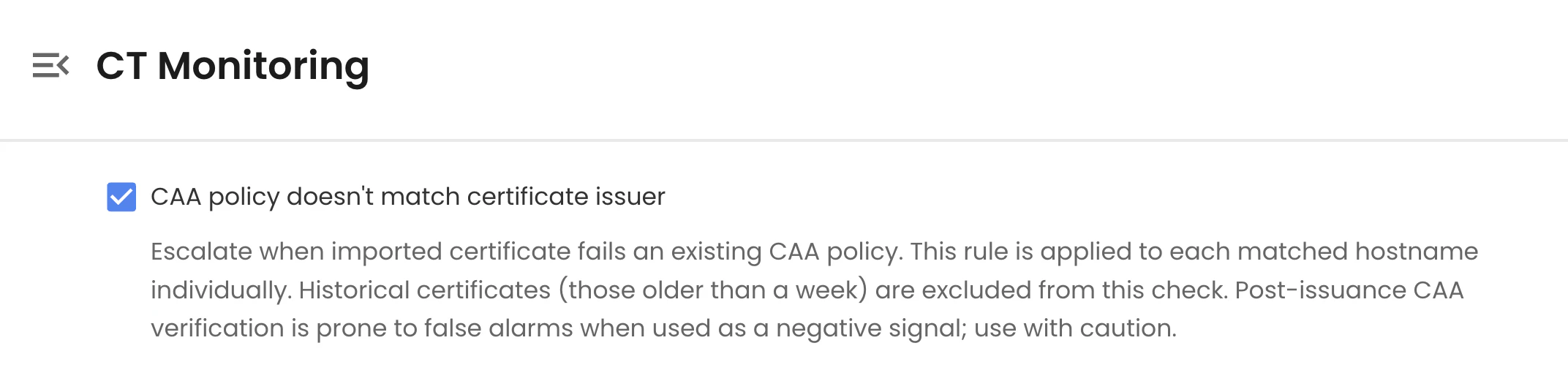
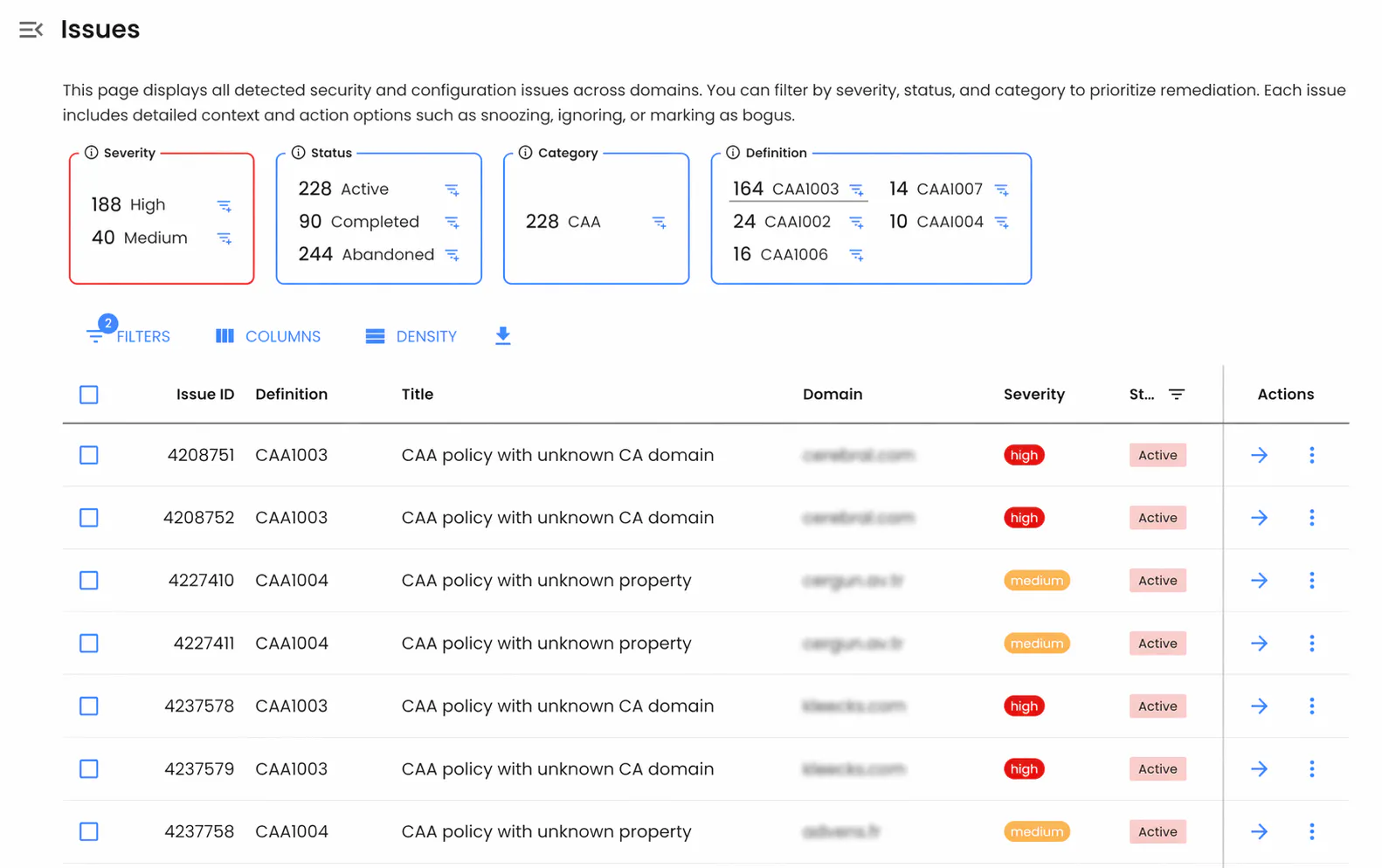
Le CA sono tenute a verificare e rispettare i record CAA prima dell'emissione. Se un certificato scoperto viola la tua policy CAA, Red Sift Certificates segnalerà il problema di configurazione CAA (ad esempio, un record CAA malformato o una proprietà mancante) e ti invierà un avviso per la visibilità.
Livello 2: Configurare il monitoraggio CT
CAA impedisce alle CA conformi di emettere certificati non autorizzati, ma non ferma una CA compromessa o non conforme. Il monitoraggio CT è il modo in cui rilevi ciò che CAA non può prevenire.
Red Sift Certificates monitora continuamente i log CT e crea un caso per ogni certificato appena scoperto che corrisponde ai tuoi domini. Ogni caso viene automaticamente valutato in base a una serie di regole di chiusura ed escalation per determinare se il certificato è legittimo, inatteso o un potenziale indicatore di compromissione.
Regole di chiusura
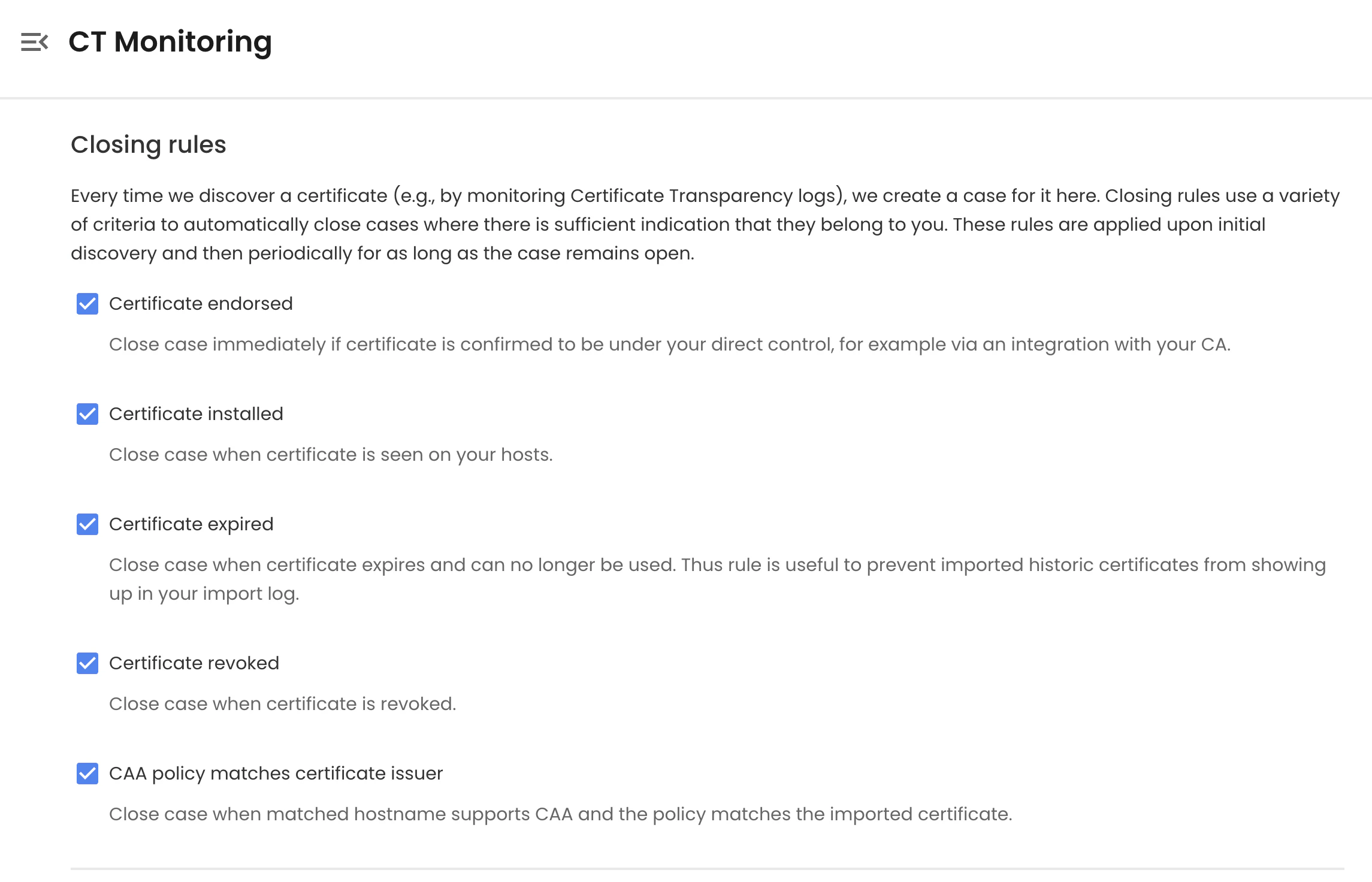
Le regole di chiusura risolvono automaticamente i casi in cui vi sono prove sufficienti che il certificato è legittimo:
Regole di chiusura
Regola | Note |
Il certificato è approvato (contrassegnato come noto) | Attivata quando un certificato viene importato tramite un'integrazione CA o contrassegnato tramite API. Si tratta di certificati garantiti sotto il tuo controllo, quindi i casi vengono chiusi immediatamente. |
Il certificato è installato sui tuoi host | Confermato tramite osservazione attiva dell'host |
Il certificato è scaduto | Evita che i certificati storici affollino la coda |
Il certificato è revocato | Chiude i casi per i certificati revocati dalla CA emittente e non più utilizzabili |
La policy CAA corrisponde all'emittente del certificato | Conferma che la CA era autorizzata a emettere. Si applica solo agli hostname con un record CAA impostato |
L'emittente corrisponde a parole chiave note | Chiude i casi in cui il nome dell'emittente corrisponde a un elenco di parole chiave fidate. |
Il caso è aperto da N giorni senza escalation | Chiude automaticamente i casi non aggiornati che non hanno attivato alcuna regola di escalation. Consigliato: 30 giorni. |
Livello 3: Monitoraggio CT ad alta affidabilità
Il monitoraggio CT standard segnala le anomalie in modo reattivo. Il Monitoraggio CT ad alta affidabilità adotta un approccio più rigoroso: costruisce un inventario completo di ogni certificato che possiedi, quindi tratta come sospetto per impostazione predefinita qualsiasi elemento nei log CT che non fa parte di quell'inventario.
Questo richiede due cose:
- Un inventario completo di elementi "noti e affidabili". Costruito importando i certificati tramite integrazioni CA o l'API Create Certificate. Ogni certificato importato viene automaticamente contrassegnato come approvato (noto per essere sotto il tuo controllo).
- Regole di escalation rigorose. Configurate per far scalare qualsiasi certificato non tracciato entro una breve finestra temporale.
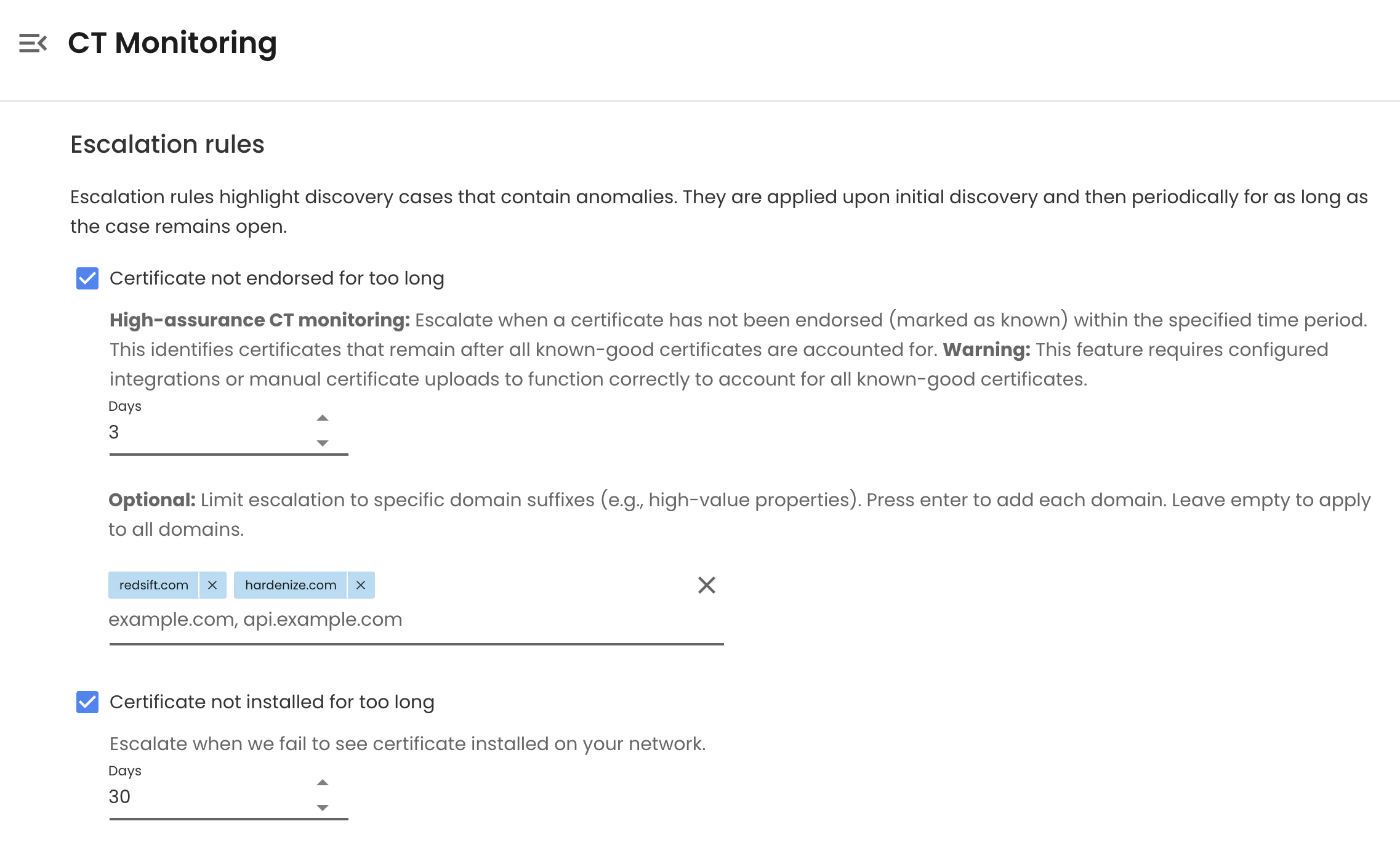
Regole di escalation
Regola | Note |
Certificato non approvato entro X giorni | Regola principale ad alta affidabilità. Consigliato: 1-3 giorni (il valore predefinito è 30). Facoltativamente, limita l'ambito solo ai domini di alto valore. |
Certificato mai osservato installato sugli host | Rileva i certificati emessi ma mai distribuiti. Consigliato: 30 giorni. |
La policy CAA non corrisponde all'emittente del certificato | Indica un'emissione al di fuori della tua policy CA consentita. Da usare con cautela. |
Il certificato non è conforme a CT | Può indicare un'emissione non standard o un certificato inviato al di fuori dei normali flussi di lavoro della CA |
L'emittente del certificato non è nell'elenco delle CA consentite | Richiede la definizione di un elenco esplicito di emittenti fidati |
L'emittente corrisponde a parole chiave sospette | Ad esempio, nomi di CA sconosciuti, CA interne/di test, emittenti a rischio noto |
Il certificato supera la durata massima | Segnala violazioni della policy, ad esempio validità superiore a 200 giorni |
Nota: i log CT presentano un ritardo di merge intrinseco, fino a 24 ore per alcuni log. Red Sift elabora i certificati man mano che appaiono nei log CT, quasi in tempo reale ma non istantaneamente.
Mettere tutto insieme
Certificate Transparency trasforma un rischio invisibile, in cui qualsiasi CA può emettere certificati per qualsiasi dominio, in un segnale pubblicamente verificabile. Ma i dati CT grezzi sono rumorosi; trasformarli in un sistema di allerta precoce affidabile richiede un inventario noto e affidabile, regole di chiusura sensate e soglie di escalation rigorose.
Red Sift Certificates riunisce questi tre livelli in un unico posto: applicazione della policy CAA, monitoraggio CT continuo ed escalation ad alta affidabilità supportata da quasi un decennio di acquisizione di log CT. Inizia con la base consigliata, quindi restringi le regole di escalation sui tuoi domini di maggior valore man mano che il tuo inventario noto e affidabile matura.
Pronto per iniziare? Iscriviti per una prova di Red Sift Certificates Lite, oppure accedi per configurare il Monitoraggio CT ad alta affidabilità per i tuoi domini se hai già un account.

Bhushan is the leading Principal Engineer for Red Sift's Certificate products and innovation.